
Welcome to Nazara's documentation hub!
Nazara is a Rust tool used to automate the registration and update process of machines and VMs in the IPAM tool NetBox.
This documentation is split by target group. Check the navigation bar on the left hand side for all pieces of information that are relevant for you.
Please Open an issue on Codeberg.
Compatibility
We strive to make sure to stay compatible with the most recent NetBox version. Here you can see which version of Nazara is compatible with which version of NetBox (and if we still support it). When major ports to new versions of NetBox happen - which usually includes breaking changes - the old version of Nazara will be moved to its own branch and tagged accordingly.
| Nazara Version | NetBox Version | Branch | maintained? |
|---|---|---|---|
v0.2.0 | v4.3.x, and newer | main | ✅ |
v0.1.1 | v4.3.x, v4.4.x, 4.5.x* | version/0.1.1 | ❌ |
v0.1.0 | v4.3.x, v4.4.x | version/0.1.0 | ❌ |
v0.1.0_beta.3 | v4.3.x, v4.4.x | version/beta-3 | ❌ |
v0.1.0_beta.2 | v4.3.x, v4.4.x | version/beta-2 | ❌ |
v0.1.0_beta.1 | v4.3.x | version/beta-1 | ❌ |
v0.1.0_alpha.2 | v3.6.x | version/alpha-2 | ❌ |
Maintenance work on these older versions is not planned currently.
Nazara was developed for and on Linux systems. We have no plans to support Windows or Mac in the foreseeable future. If you would like to add support for this, please open a discussion in our Codeberg repository.
Distribution Channels
This is an overview of channels through which you can get Nazara.
| Platform/Channel | Version | Official? |
|---|---|---|
crates.io | v0.2.0 | yes |
| openSUSE Tumbleweed | --coming soon-- | --coming soon-- |
For information about who maintains a package you are looking for, try
looking into the PACKAGERS.md file in our project's root directory.
Design Documentation
Here you can find all documentation relating to Nazara's structure, architecture and style.
Nazara Architecture Guide
Introduction
This document explains the structure and architecture chosen for Nazara and gives an overview over its components.
Nazara is a tool for automating the registration and update process of physical machines and virtual machines in NetBox, a open-source IPAM tool.
Ease of use is important in this regard, users should be able to pick Nazara up quickly, and be able to comfortably integrate it into their daily workflow. With automation if they wish.
Nazara, very roughly, has 3 main functions: Collection, Translation and Publishing. (Excluding the configuration module here)
The Collection module is soley responsible for collecting information about the host system the user wants to register. This includes things like the device's network interfaces, IP addresses and other hardware information. All collected from the DMI tables.
The Translator module handles data process and translates all information that the collector has collected into appropriate
API payload objects. These objects are defined by the NetBox API and brought to Nazara via the thanix_client
crate. This crate is generated automatically by us and serves as the API client library used for making API requests to NetBox.
The Publisher module is the most "superior" module hierarchially. It handles the whole registration process and decided when which translation needs to be made and which API call to be sent.
Goals
Now, what problem does Nazara solve?
Some system administrators have a overwhelming number of machines. Or maybe they get sent upgrades to prototype hardware multiple times a year. When dealing with this large amount of machine turnover, Nazara provides an easy to use tool to eliminate the tedious task of manually registering or updating device or VM information.
What are the essential features and goals for Nazara?
- Ease of use
- Registration of machines and VMs and their associated components
- Automatization of custom field collection
Non-Goals
Nazara is simply a tool to register/update machines and VMs in NetBox. Beyond that it is currently not planned to have any other kind of managing role alongside NetBox or other IPAM tools.
Design
Nazara - codewise - is supposed to be highly modular and respect strict separation of concerns. This means that one logical unit does only one thing and contain all the logic necessary to achieve their goal.
This starts with modules: The Collector, Configuration, Translator and Publisher modules all only have one
responsibility.
We believe that - wherever sensible and possible - each module, each file and each function should have one responsibility.
For a new additional feature we would rather introduce another module that handles that responsibility than break this principle.
In addition to this all interfaces between modules should be as small as possible. Preferably one or two functions. This makes it easier to mentally follow the execution flow and avoids any kind of cross referencing or massive rewrites once a single module needs to be rewritten.
This philosophy should also extend to Nazara's Git-History. You can find more on that in the
Contributor Guide.
High-Level-Design
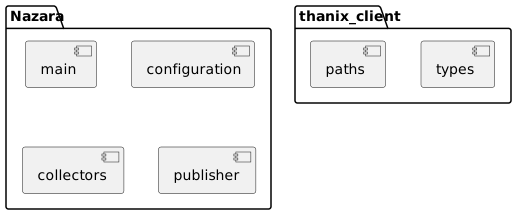
As mentioned before, Nazara is designed with strict separation of concerns in mind. The following is a very high-level overview of Nazara's four logical parts:
- The Collectors
- The Configuration Package
- The Publisher
- The Main module
It also shows the two modules of our thanix_client crate, which we created specifically
for sending API requests to NetBox. More on that later.
The following diagram gives an overview over the program flow once started by a user.
Note that the exact function calls within translator.rs and the difference between POST/PATCH
requests has been omitted for simplicity.
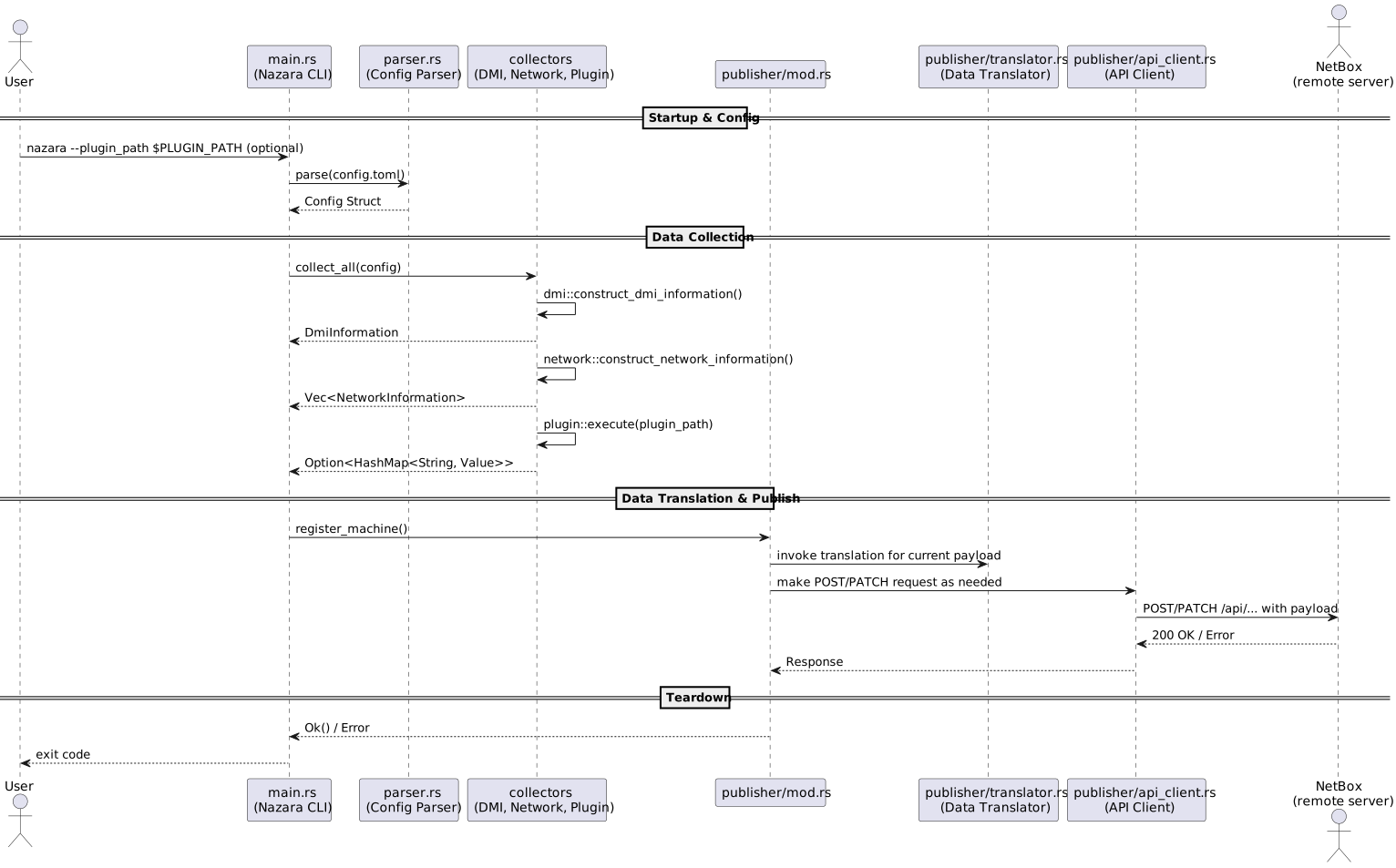
In reality, the publisher checks if the device has already been registered. The easiest way to do this
would be to pass the ID the device or VM has in NetBox, however we are capable of searching given several
parameters like serial number or UUID. Though these methods are less reliable.
In any way, the publisher then decides whether a POST or PATCH request shall be made.
Nazara Code Style Guide
General Guide
In regards to formatting, we follow the current Rust code style set by the Cargo
formatter (cargo fmt).
The easiest way to enforce this, is using pre-commit to automatically format
and check any code before it is committed.
This style is enforced by our CI as well. PRs will not be accepted unless the formatting issues are fixed.
Panics
We heavily discourage the use of the panic!() macro when aborting the process.
Instead, we prefer to handle an error and abort gracefully with a helpful error
message and error code.
We only want to panic, when the issue we encounter is both catastrophic and unfixable by the user.
These are scenarios in which we don't want to panic:
- When input or config parameters are missing
- When connection to NetBox fails
- When an API request returns a different error code that Ok
While we want to panic in these cases:
- When filesystem operations fail
- When Nazara is not run as root
Instead of panicking, we write custom error types to wrap errors of certain functions and include a well formatted error message alongside the error.
For detailed information on Nazara's error handling approach, including the
NazaraError enum and best practices, see the
Error Handling Guide.
Example:src/error.rs
Example:src/error.rs
In this example, you can get an overview over the error.rs module and get an idea on how to handle errors in the code.
#![allow(unused)]
fn main() {
#[derive(Debug)]
pub enum NazaraError {
    /// Something went wrong trying to parse DMI tables.
    Dmi(dmidecode::InvalidEntryPointError),
    /// Used to indicate that the collection of system data failed.
    UnableToCollectData(String),
    /// Used to indicate that one of the collected NWIs might be malformed or invalid.
    InvalidNetworkInterface(String),
    /// Used in case the NWI collector crate cannot find any interfaces.
    NoNetworkInterfaces(String),
    /// Rust couldn't convert a byte sequence to a UTF-8 string.
    UnableToParseUTF8(std::string::FromUtf8Error),
    InvalidPluginOutput(serde_json::Error),
    PluginExecution(String),
    /// Used for handling errors during file operations.
    FileOpError(std::io::Error),
    /// Indicates that no config file has been found, or it has been moved or deleted during program startup.
    NoConfigFileError(String),
    /// Indicates that a required config option is missing from the config file.
    MissingConfigOptionError(String),
    /// The Deserialization of a buffer to a type failed.
    DeserializationError(toml::de::Error),
    /// An error occured during the serialization of config parameters to a TOML value.
    SerializationError(toml::ser::Error),
    /// An error has occured while accessing data returned by NetBox.
    NetBoxApiError(String),
    /// Data returned by NetBox is incomplete.
    NetBoxMissingField(String, String),
    /// Wraps a `reqwest::Error`. Used for handling failures with requests and responses.
    Reqwest(reqwest::Error),
    /// NetBox returned a response with an unexpected code.
    UnexpectedResponse(reqwest::blocking::Response),
    /// Used to indicate the `thanix_client` version is incompatible with NetBox.
    VersionMismatch,
    /// Used to indicate that NetBox's initial response does not contain the application version.
    MissingVersion,
    /// Wraps a `serde_json::Error`. Used to handle failures with response serialization.
    JsonParse(serde_json::Error),
    NetlinkError(String),
    /// Specified primary IP has not been registered with this device or VM.
    InvalidPrimaryIp(String),
    /// Expects a `String` message. Used for edge cases and general purpose error cases.
    Other(String),
}

pub type NazaraResult<T> = Result<T, NazaraError>;

impl NazaraError {
    /// Log this error with failure! and return it wrapped in Err(...)
    pub fn fail<T>(self) -> NazaraResult<T> {
        failure!("{}", self);
        Err(self)
    }

    /// Log this error with additional context prefix.
    /// Used when we need to log multiple errors but continue processing to fail in the end
    /// either with the calling function or some other higher instance.
    ///
    /// The optional context in this case refers to the module or program part that the error
    /// occurred in. For example: [DHCP-Mode].
    pub fn log(&self, context: Option<&str>) {
        if let Some(ctx) = context {
            failure!("[{}] {}", ctx, self);
            return;
        }
        failure!("{}", self);
    }
}

impl std::fmt::Display for NazaraError {
    fn fmt(&self, f: &mut std::fmt::Formatter<'_>) -> std::fmt::Result {
        match self {
            NazaraError::Dmi(err) => {
                write!(f, "DMI Error: {err}")
            }
            NazaraError::UnableToCollectData(err) => {
                write!(f, "Collector Error: {err}")
            }
            NazaraError::InvalidNetworkInterface(err) => {
                write!(f, "Network Collector Error: {err}")
            }
            NazaraError::NoNetworkInterfaces(err) => {
                write!(f, "Network Collector Error: {err}")
            }
            NazaraError::UnableToParseUTF8(err) => {
                write!(f, "Unable to parse stdout from UTF8 to string: {err}")
            }
            NazaraError::InvalidPluginOutput(err) => {
                write!(f, "Plugin returned invalid JSON: {err}")
            }
            NazaraError::PluginExecution(err) => {
                write!(f, "Plugin execution failed: {err}")
            }
            NazaraError::FileOpError(err) => {
                write!(f, "File operation failed: {err}")
            }
            NazaraError::NoConfigFileError(err) => {
                write!(f, "No config file found: {err}")
            }
            NazaraError::MissingConfigOptionError(err) => {
                write!(f, "Missing required config parameter: {err}")
            }
            NazaraError::DeserializationError(err) => {
                write!(f, "Invalid config file: {err}")
            }
            NazaraError::SerializationError(err) => {
                write!(f, "Serialization error: {err}")
            }
            NazaraError::Reqwest(err) => {
                write!(f, "Failed to perform an HTTP request: {err}")
            }
            NazaraError::NetBoxApiError(err) => {
                write!(f, "NetBox API Error: {err}")
            }
            NazaraError::NetBoxMissingField(struc, field) => {
                write!(
                    f,
                    "NetBox returned incomplete data: Structure \"{struc}\" is missing field expected field \"{field}\""
                )
            }
            NazaraError::UnexpectedResponse(err) => {
                let status = err.status();
                write!(
                    f,
                    "Got an unexpected HTTP response {} from NetBox: {:?}",
                    status, err
                )
            }
            NazaraError::NetlinkError(err) => {
                write!(f, "Netlink Error: {err}")
            }
            NazaraError::VersionMismatch => {
                write!(
                    f,
                    "Client version incompatible with NetBox version! Use client v1.x for NetBox v3.6.x and above, and v2.x for NetBox 4.x.",
                )
            }
            NazaraError::MissingVersion => {
                write!(
                    f,
                    "NetBox version missing from response. Please check your installation.",
                )
            }
            NazaraError::JsonParse(error) => {
                write!(f, "Error while parsing JSON: {error}")
            }
            NazaraError::InvalidPrimaryIp(addr) => {
                write!(
                    f,
                    "Configured primary IP '{addr}' does not belong to any interface registered to this device."
                )
            }
            NazaraError::Other(msg) => f.write_str(&msg),
        }
    }
}

impl From<std::io::Error> for NazaraError {
    fn from(value: std::io::Error) -> Self {
        Self::FileOpError(value)
    }
}

impl From<serde_json::Error> for NazaraError {
    fn from(value: serde_json::Error) -> Self {
        Self::JsonParse(value)
    }
}

impl From<std::string::FromUtf8Error> for NazaraError {
    fn from(value: std::string::FromUtf8Error) -> Self {
        Self::UnableToParseUTF8(value)
    }
}

impl From<reqwest::Error> for NazaraError {
    fn from(value: reqwest::Error) -> Self {
        Self::Reqwest(value)
    }
}

impl From<dmidecode::InvalidEntryPointError> for NazaraError {
    fn from(value: dmidecode::InvalidEntryPointError) -> Self {
        Self::Dmi(value)
    }
}

impl From<&str> for NazaraError {
    fn from(value: &str) -> Self {
        Self::Other(value.to_owned())
    }
}

impl From<toml::de::Error> for NazaraError {
    fn from(value: toml::de::Error) -> Self {
        Self::DeserializationError(value)
    }
}
}
Focus on Readability
When writing code, we value readability above complexity.
Rust offers a lot of possibilities when it comes to reducing code down into a one-line statement. And that's nice, and sometimes even necessary.
However, we want to take a readability first approach with our codebase. Both to aid maintainability and increase accessibility for newcomers.
Of course, sometimes using Rust's more "advanced" features will drastically improve performance. So a balance has to be struck between readability and performance. It is very hard to define a solid policy for this, so this is a decision every developer and contributor has to do for themselves and - when necessary - engage in discussion with maintainers, devs and other contributors about their approach and possible alternatives.
Documenting Code
For a similar reason, we encourage devs to properly document their contributions. This includes but is not limited to:
- Using inline comments to explain possibly hard to understand syntax
- Using Rust's powerful docstring feature to properly document functions, structs and modules
- Adding to this documentation when applicable
- Filling out Issue and PR templates appropriately to aid maintainers review their changes
The following examples will show you an ideal docstring style.
Example: Documenting Functions
Example: Documenting Functions
Documenting Functions:
#![allow(unused)]
fn main() {
/// This function does X.
///
/// This function does X by doing Y using Z. (Detailed explanation optional)
///
/// # Parameters
/// * `arg: str` - A string argument to process
///
/// # Returns
/// * `Ok(str)` - Returns A, if ...
/// * `Err` - Returns an `ErrType`
pub fn foo(arg: str) -> Result<str, Err> {
 // ...
}
}
While not universally used by all projects, we use # Parameters and # Returns
sections, especially for larger functions.
If a function does not take arguments, the # Parameters section can be omitted.
However, if the function does not return (! type) - or returns (), this has to be indicated
in the # Returns section.
Other sections we use are:
# Aborts- If the function aborts the program. (E.g When input parameters are missing)# Panics- If the function can cause apanic!().
For both of these sections, list all - or at least the most common - reasons this behaviour can occur. This can help debugging immensely.
#![allow(unused)]
fn main() {
/// This function does X.
///
/// # Parameters
/// - `path: &str` - The path to a file
///
/// # Returns
/// - `String` - The contents of the file.
///
/// # Aborts
/// This function will exit the process if the file cannot be found.
pub fn read_file(path: &str) -> String {
    match fs::read_to_string(path) {
        Ok(contents) => contents,
        Err(err) => {
            eprintln!("[Error] File '{}' does not exist: {}", path, err);
            process::exit(1);
        }
    }
}
}
Example: Documenting Structs
Example: Documenting Structs
Documenting Structs:
#![allow(unused)]
fn main() {
/// Information about a Person.
pub struct Person {
    /// The name of the Person.
    pub name: String,
    /// The age of the Person.
    pub age: i64,
}
}
It is encouraged to briefly document every field of your struct, whether they are pub
or not does not matter.
Example: Documenting Modules
Example: Documenting Modules
Documenting Modules:
#![allow(unused)]
fn main() {
//! This module handles X.
}
You can go into depth here about what a module does. This is encouraged for larger modules.
Please be aware, that a one-liner docstring above a function will not suffice. Maintainers may ask you to stick to the given format for your contribution.
We are aware that to some of you, this feels like cluttering the code files. However, we believe that properly documenting our code is the key to providing a more inclusive and more maintainable development experience for all.
Terminal Output/User Interface
When it is necessary to inform the user about a process, we want to make it short, but as expressive as possible. For this, the following styles apply:
Process X has been started...- Basic white text indicates the current process.\x1b[32m[success]\x1b[0m Something has succeeded- Green colored[success]prefix before the message.\x1b[31m[error]\x1b[0m Something has failed!- Red colored[error]prefix before error message. This should automatically be added by our custom error types when they are given a error message.\x1b[36m[info]\x1b[0m Information level message.- Light blue colored[info]prefix.\x1b[33m[warning]\x1b[0m Something went wrong, but we can continue...- Yellow colored[warning]prefix.
To unify this coloring we have implemented several macros to be used for these status messages. These apply formatting and colors automatically and disable colors when the host's terminal does not support it.
The macros are called success!, warn!, failure!, info!. For information
on when to use these macros and how they integrate with NazaraError, see the
Error Handling Guide.
Example: Status Message Macros
Example: Status Message Macros
#![allow(unused)]
fn main() {
match some_func(x) => {
    Ok(_) => {
        success!("This worked!");
    },
    Err(e) => {
        failure!("An error occurred: {}", e);
        // Handle the error.
    }
}
}
Nazara Error Handling Guide
Philosophy
Nazara follows a "fail gracefully" philosophy. We prefer returning descriptive errors over panicking, reserving panics only for truly catastrophic and unfixable situations.
Core Principles:
- Single Source of Truth: Error messages are defined once in
NazaraErrorvariants and displayed consistently - Immediate Feedback: Errors are logged immediately using the
failure!macro for user visibility - Clean Propagation: Most functions use the
?operator without logging noise - Context When Needed: Optional context prefixes indicate which module or operation triggered the error
The NazaraError Enum
All errors in Nazara are represented by the NazaraError enum in src/error.rs:
#![allow(unused)]
fn main() {
pub enum NazaraError {
    /// Something went wrong trying to parse DMI tables.
    Dmi(dmidecode::InvalidEntryPointError),
    /// Used to indicate that the collection of system data failed.
    UnableToCollectData(String),
    /// Used for handling errors during file operations.
    FileOpError(std::io::Error),
    /// Indicates that a required config option is missing from the config file.
    MissingConfigOptionError(String),
    /// An error occurred while accessing data returned by NetBox.
    NetBoxApiError(String),
    /// Expects a `String` message. Used for edge cases and general purpose error cases.
    Other(String),
    // ... other variants
}
}
Display Trait Implementation
Every NazaraError variant implements std::fmt::Display to provide user-friendly error messages:
#![allow(unused)]
fn main() {
impl std::fmt::Display for NazaraError {
    fn fmt(&self, f: &mut std::fmt::Formatter<'_>) -> std::fmt::Result {
        match self {
            NazaraError::FileOpError(err) => {
                write!(f, "File operation failed: {err}")
            }
            NazaraError::NetBoxApiError(msg) => {
                write!(f, "NetBox API Error: {msg}")
            }
            NazaraError::Other(msg) => f.write_str(&msg),
            // ... other variants
        }
    }
}
}
The Display implementation should never call failure! or any other logging macro. It should only format the error message.
Convenience Methods
The NazaraError enum provides two convenience methods for common error handling patterns:
fail() - Log and Return
#![allow(unused)]
fn main() {
impl NazaraError {
    /// Log this error with failure! and return it wrapped in Err(...)
    pub fn fail<T>(self) -> NazaraResult<T> {
        failure!("{}", self);
        Err(self)
    }
}
}
Purpose: Combines logging and returning into a single operation.
Example: Using the fail-function to log and return an error
Example: Using the fail-function to log and return an error
#![allow(unused)]
fn main() {
return NazaraError::Other("Config file contains invalid entries".to_owned()).fail();
}
log() - Log with Context
#![allow(unused)]
fn main() {
impl NazaraError {
    /// Log this error with additional context prefix.
    /// Used when we need to log multiple errors but continue processing to fail in the end
    /// either with the calling function or some other higher instance.
    ///
    /// The optional context in this case refers to the module or program part that the error
    /// occurred in. For example: [DHCP-Mode].
    pub fn log(&self, context: Option<&str>) {
        if let Some(ctx) = context {
            failure!("[{}] {}", ctx, self);
            return;
        }
        failure!("{}", self);
    }
}
}
Purpose: Log errors with optional context when you need to accumulate multiple errors before failing.
Example: Logging an error but continue processing
Example: Logging an error but continue processing
#![allow(unused)]
fn main() {
// Accumulate errors, fail at the end
for validation in validations {
    if !validation.is_valid() {
        let err = NazaraError::Other(format!("Validation '{}' failed", validation.name()));
        err.log(None);
        error_count += 1;
    }
}

if error_count > 0 {
    return NazaraError::Other("Multiple validations failed".to_owned()).fail();
}
}
Example: Logging an error with context
Example: Logging an error with context
context indicates where or why this error has occurred. For example when working with the ip-mode flags,
errors rooted in the changes of IP addresses by DHCP or something similar have the context "DHCP-Mode".
#![allow(unused)]
fn main() {
let err = NazaraError::NetBoxApiError("IPv4 not found".to_owned());
err.log(Some("DHCP-Mode"));
return Err(err);
}
Examples
Example: Logging with Return
Example: Logging with Return
Use when an error is terminal and should be returned immediately.
#![allow(unused)]
fn main() {
return NazaraError::Other("Config file contains invalid entries".to_owned()).fail();
}
Example: Log with Context, Then Return
Example: Log with Context, Then Return
Use when the error needs additional module/operation context.
#![allow(unused)]
fn main() {
let err = NazaraError::NetBoxApiError(
    format!("IPv4 address \"{}\" was not registered in NetBox", ip)
);
err.log(Some("DHCP-Mode"));
return Err(err);
}
Or in a closure (for use with ok_or_else):
#![allow(unused)]
fn main() {
let ipv4_id = search_ip(client, &ip.to_string(), None)?.ok_or_else(|| {
    let err = NazaraError::NetBoxApiError(format!("IPv4 \"{}\" not found", ip));
    err.log(Some("DHCP-Mode"));
    err
})?;
}
Example: Accumulate Errors, Fail Later
Example: Accumulate Errors, Fail Later
Use when processing multiple items and collecting all errors before failing.
#![allow(unused)]
fn main() {
let mut config_errors = Vec::new();

for field in required_fields {
    if config.get(field).is_none() {
        let err = NazaraError::MissingConfigOptionError(field.to_string());
        err.log(None);
        config_errors.push(err);
    }
}

if !config_errors.is_empty() {
    return NazaraError::Other("Missing required config fields".to_owned()).fail();
}
}
Example: Custom User-Facing Messages
Example: Custom User-Facing Messages
When you need to provide specific user guidance, use failure! directly.
#![allow(unused)]
fn main() {
failure!(
    "Tag '{}' does not exist. Use --prepare-environment to create it.",
    tag_name
);
}
This is clearer than trying to fit the guidance into a NazaraError variant's display message.
When to Use What
Use .fail() when:
- The error is terminal (nothing else can be done)
- The error message is sufficient (no additional context needed)
- You want clean, single-line error handling
- This is the 90% common case
Use .log() when:
- You need to accumulate multiple errors before failing
- You want to add module/operation context
- The error should be logged but processing should continue
- You need to track multiple issues
Use failure! directly when:
- You need a custom message with user guidance
- The message is temporary/debugging (will be replaced later)
- You're providing feedback before returning a different error
Don't use either when:
- You can simply return the error with
?(no logging needed) - The caller will handle the error (low-level utilities)
- The error will be logged by the caller anyway
Best Practices
1. Choose the Right Error Variant
Prefer specific variants over Other when possible:
#![allow(unused)]
fn main() {
// GOOD
return NazaraError::MissingConfigOptionError("netbox_uri".to_owned()).fail();

// OK (when no specific variant fits)
return NazaraError::Other("Custom error message".to_owned()).fail();
}
2. Include Context in Error Messages
When using Other, make the message descriptive:
#![allow(unused)]
fn main() {
// GOOD
return NazaraError::Other("Config file contains invalid entries".to_owned()).fail();

// BAD
return NazaraError::Other("Error".to_owned()).fail();
}
3. Use Context for Module Identification
When logging with context, use module or operation names:
#![allow(unused)]
fn main() {
err.log(Some("DHCP-Mode"));
err.log(Some("Config-Parser"));
}
4. Don't Duplicate Error Messages
The error message should be defined once—in the Display implementation or the error construction:
#![allow(unused)]
fn main() {
// GOOD
let msg = "Config file contains invalid entries".to_owned();
failure!("{}", msg);
return Err(NazaraError::Other(msg));

// REDUNDANT (duplicates the message)
failure!("Config file contains invalid entries");
return NazaraError::Other("Config file contains invalid entries".to_owned()).fail();
}
5. Let Errors Propagate
For low-level utility functions, just return errors. Let the caller decide whether to log:
#![allow(unused)]
fn main() {
// In a low-level utility
pub fn read_config_file() -> NazaraResult<ConfigData> {
    let mut file = File::open(get_config_path(true))?;  // Just propagate
    // ...
}

// In the calling function
let config = read_config_file()
    .map_err(|e| e.log(None))?;  // Log here
}
Error Flow
[Deep Function] → Creates/Returns NazaraError
        ↓ (via ? operator)
[Middle Function] → Propagates with ?
        ↓ (via ? operator)
[Application Logic] → Logs with .fail() or .log()
        ↓
[main.rs] → Catches error, logs with failure!
        ↓
[stderr] → User sees formatted error message
Example: Complete Error Handling Flow
Here's how error handling works in a real scenario:
// 1. Low-level function (no logging, just propagation)
pub fn read_config_file() -> NazaraResult<ConfigData> {
    let mut file = File::open(get_config_path(true))?;
    let mut contents = String::new();
    file.read_to_string(&mut contents)?;
    toml::from_str(&contents).map_err(NazaraError::DeserializationError)
}

// 2. Mid-level function (propagates errors)
pub fn validate_config(config: &ConfigData) -> NazaraResult<()> {
    if config.netbox_uri.is_empty() {
        return Err(NazaraError::MissingConfigOptionError("netbox_uri".to_owned()));
    }
    Ok(())
}

// 3. Application logic (logs and returns)
pub fn setup_configuration() -> NazaraResult<ConfigData> {
    let config = read_config_file()?;
    validate_config(&config)?;

    if config.is_invalid() {
        return NazaraError::Other("Config validation failed".to_owned()).fail();
    }

    Ok(config)
}

// 4. Main entry point (logs final error)
fn main() {
    match nazara::run() {
        Ok(_) => success!("All done!"),
        Err(e) => failure!("{}", e),  // Uses failure! for consistency
    }
}
Remember: Errors should be logged once, at the appropriate level, with sufficient context.
Contributing to Nazara
Thank you for considering contributing to Nazara!
The following documents should provide you with all the information you need to start contributing to Nazara.
If you are completely new, make sure you have the following things installed:
rustc: The Rust compilerrustup: The Rust toolchain managercargo: The Rust package manager
If you are unsure about how to set up a Rust development environment, please refer to the Rust documentation for a guide.
Becoming a Packager
If you would like to package Nazara for your distribution, please open an Issue and refer to our Becoming a Packager guide for more info.
Contributor Covenant Code of Conduct
Our Pledge
We as members, contributors, and leaders pledge to make participation in our community a harassment-free experience for everyone, regardless of age, body size, visible or invisible disability, ethnicity, sex characteristics, gender identity and expression, level of experience, education, socio-economic status, nationality, personal appearance, race, religion, or sexual identity and orientation.
We pledge to act and interact in ways that contribute to an open, welcoming, diverse, inclusive, and healthy community.
Our Standards
Examples of behavior that contributes to a positive environment for our community include:
- Demonstrating empathy and kindness toward other people
- Being respectful of differing opinions, viewpoints, and experiences
- Giving and gracefully accepting constructive feedback
- Accepting responsibility and apologizing to those affected by our mistakes, and learning from the experience
- Focusing on what is best not just for us as individuals, but for the overall community
Examples of unacceptable behavior include:
- The use of sexualized language or imagery, and sexual attention or advances of any kind
- Trolling, insulting or derogatory comments, and personal or political attacks
- Public or private harassment
- Publishing others' private information, such as a physical or email address, without their explicit permission
- Any conduct or speech intended on or capable of disparaging, ridiculing a person or group based on their inherent traits such as their gender, gender identity, name, age, sexual orientation, ethnicity, language, disability or their economic or educational background
- Any conduct or speech intended to or capable of creating an immediate or plausible threat towards any person or group based on any of their traits mentioned above
- Other conduct which could reasonably be considered inappropriate in a professional setting
Enforcement Responsibilities
Community leaders are responsible for clarifying and enforcing our standards of acceptable behavior and will take appropriate and fair corrective action in response to any behavior that they deem inappropriate, threatening, offensive, or harmful.
Community leaders have the right and responsibility to remove, edit, or reject comments, commits, code, wiki edits, issues, and other contributions that are not aligned to this Code of Conduct, and will communicate reasons for moderation decisions when appropriate.
Scope
This Code of Conduct applies within all community spaces, and also applies when an individual is officially representing the community in public spaces. Examples of representing our community include using an official e-mail address, posting via an official social media account, or acting as an appointed representative at an online or offline event.
Enforcement
Instances of abusive, harassing, or otherwise unacceptable behavior may be reported to the community leaders responsible for enforcement at tiara.dev@proton.me. All complaints will be reviewed and investigated promptly and fairly.
All community leaders are obligated to respect the privacy and security of the reporter of any incident.
Enforcement Guidelines
Community leaders will follow these Community Impact Guidelines in determining the consequences for any action they deem in violation of this Code of Conduct:
1. Correction
Community Impact: Use of inappropriate language or other behavior deemed unprofessional or unwelcome in the community.
Consequence: A private, written warning from community leaders, providing clarity around the nature of the violation and an explanation of why the behavior was inappropriate. A public apology may be requested.
2. Warning
Community Impact: A violation through a single incident or series of actions.
Consequence: A warning with consequences for continued behavior. No interaction with the people involved, including unsolicited interaction with those enforcing the Code of Conduct, for a specified period of time. This includes avoiding interactions in community spaces as well as external channels like social media. Violating these terms may lead to a temporary or permanent ban.
3. Temporary Ban
Community Impact: A serious violation of community standards, including sustained inappropriate behavior.
Consequence: A temporary ban from any sort of interaction or public communication with the community for a specified period of time. No public or private interaction with the people involved, including unsolicited interaction with those enforcing the Code of Conduct, is allowed during this period. Violating these terms may lead to a permanent ban.
4. Permanent Ban
Community Impact: Demonstrating a pattern of violation of community standards, including sustained inappropriate behavior, harassment of an individual, or aggression toward or disparagement of classes of individuals.
Consequence: A permanent ban from any sort of public interaction within the community.
Attribution
This Code of Conduct is adapted from the Contributor Covenant, version 2.0, available at https://www.contributor-covenant.org/version/2/0/code_of_conduct.html.
Community Impact Guidelines were inspired by Mozilla's code of conduct enforcement ladder.
For answers to common questions about this code of conduct, see the FAQ at https://www.contributor-covenant.org/faq. Translations are available at https://www.contributor-covenant.org/translations.
Policy on the Use of LLMs
We recognize that today LLMs have become widely accepted as tools to support software developers in their day-to-day work and even their free time open-source contributions.
Our policy is it henceforth, that contributors are free to use whatever tools they wish to craft their contributions, as long as a human is responsible for both the initial creation of a contribution (the prompting) as well as reviewing the output of their tool.
The contributor will always be seen as the author of their contribution and are thereby always responsible for the entirety of their contribution. Contributors must be sufficiently confident that the contribution is compliant to all formal requirements and best practices to be able to contribute to this project; and that this contribution is inherently worth bringing into the project. Additionally, the must be able to answer questions about their work during review.
Importantly, this policy forbids agents which take action without human supervision. Similarly, automated review tools which post comments or partake in discussions are also banned.
Transparency Requirements
Contributors must be transparent and label contributions that contain any amount of tool-generated content. This label must be present in the commit message as a message footer and must specify the exact tool name and model version.
Author: CoolCollab <cool@collab.com>
Date:   Wed Jul 22 15:53:05 2026 +0200

    Feat: Some Coool Feature


    Signed-off-by: CoolCollab <cool@collab.com>
    Assisted-by: Mistral Small 4 (mistral-ai/mistral-small-4)
If multiple tools are used, multiple Assisted-by blocks are necessary.
For issues, discussions or any other kind of community post, an alternative suitable label can be applied.
In issues, you can add a [AI-assisted] tag into an issue description.
In comments, posts or emails to a maintainer, please specify whether your findings were created with the help of AI, and to which extent.
I used Mistral Small 4 (mistral-ai/mistral-small-4) to help answer this question.
This transparency helps us understand the role of these tools.
This policy includes, but is not limited to, these types of contributions:
- Code contributions in any form (including CI configuration, build scripts and tests)
- Design Proposals or Discussions
- Issues or Security Vulnerability Reports
- Comments and Feedback on PRs
- Documentation
Rules for LLM Assisted Reviews
As stated in the beginning of this policy, any LLM or AI agent that automatically reviews contributions or discussions without human intervention is not allowed.
However, contributors and maintainers are allowed to help them review individual parts of contributions. These assisted reviews are only supposed to be used on individual code snippets and annotations in PR reviews and must be labelled clearly as laid out above.
Rules for AI Training
The Nazara Project does not allow any part of our codebase, documentation or community interaction to be scraped and used for training or building AI systems.
We do not cooperate with any individual, group or organisation that does so.
Prohibition of "AI"-generated Artwork, Music or Other Media
Due to the prevalence of stolen artwork in the training sets of generative AI, we do not accept any contribution that includes AI generated imagery, music or other kinds of media.
This prohibition extends past classic code or documentation contributions into our community spaces such as Issues, Discussions and any avenue of communication that already exists or may in the future be introduced.
No exceptions.
Restrictions
We do not allow AI agents to be used for contributions to issues labelled as good-first-issue
as these are non-critical and are meant to be learning issues for new contributors and programming beginners.
Of course this does not cover new contributors using LLMs to understand a concept before wirting their contribution by hand.
Enforcements
We reserve the right to reject or revert any contribution - in any form - which is found to violate this policy.
On repeated offenses we also reserve the right to ban any individual, group or organisation from contributing to Nazara or any project of the Nazara Project organisation.
Setting up a Test Environment
In case you don't have a dedicated test instance of NetBox, you can easily set up a local instance via docker-compose.
- Simply clone the netbox-docker repository
- Modify the
docker-compose.ymlfile to the required NetBox version
Depending on the version of Nazara you are working with, you may need to adjust the image version number in your docker-compose.yaml to fit your needs.
In case you are working on a specific issue, please make sure the Nazara version is compatible with the NetBox version you are using and also make sure that we
still support that version.
services:
    netbox: &netbox
        image: docker.io/netboxcommunity/netbox:v4.3.3
        ...
and execute these commands in accordance to netbox-docker's setup guide:
git clone -b release https://github.com/netbox-community/netbox-docker.git
cd netbox-docker
tee docker-compose.override.yml <<EOF
services:
  netbox:
    ports:
      - 8000:8080
EOF
- Then build the environment by running
docker compose up - When the container is built, you need to create a superuser test account
docker compose exec netbox /opt/netbox/netbox/manage.py createsuperuser
Simply select a username and password of your wishes.
-
When that is done, you need to create an API Token
username > API Tokens > Add a Tokenand paste it, along with the container's URL into the Nazara config file at~/.nazara/config.toml -
After that, you need to create a few dummy fields that are sadly required to create a device via API
- Device Type
- Device Role
- Manufacturer
- Site (And depending on what you want to work on, replicate the custom fields you need 1:1 from your production instance.)
If you want to specify and play around with some optional fields, you must create the objects you reference (like e.g Tenants) first.
-
After that's done, take the IDs of these objects and place it into the corresponding fields in the
~/.nazara/config.toml
Currently, the generation of the config file is still a bit wonky, so if it is not generated upon first executing nazara, copy and paste
the template from the README or src/configuration/config_template.toml.
Now it should work, if you have trouble setting it up, please reach out in the discussion section.
Testing VMs
In the previous chapter, you read up on how to set up a local NetBox instance using netbox-docker.
This guide will show you how to set up a VM that you can register/update on this container using Nazara.
Prerequisites
- Host machine with the
netbox-dockerdeployment running locally - Virtualization software (QEMU/KVM)
- A Linux ISO of your choosing
Create a new Linux VM
Use a GUI to create/manager VMs
Use a GUI to create/manager VMs
For creating and managing VMs, we recommend you use a tool like virt-manager.
You can find a step-by-step guide on how to create a new VM here
Using the Terminal
These examples are specifically for openSUSE Tumbleweed.
For package names on other distros, please refer to the list below or check your distro's package lists.
1. Install required packages
sudo zypper install -y qemu-kvm libvirt virt-manager virt-install bridge-utils
sudo systemctl enable --now libvirtd
2. Create Linux VM
Replace $ISO_PATH with the path to the ISO file and $DISK_PATH to the path
where you want your virtual disk to be located.
- Create a new virtual disk image
qemu-img create -f qcow2 $DISK_PATH 20G
- Create the Virtual Machine
sudo virt-install \
    --name nazara-test-vm \
    --ram 2048 \
    --vcpus 2 \
    --os-type linux \
    --os-variant $VARIANT \
    --network network=default \
    --graphics spice \
    --cdrom $ISO_PATH \
    --disk path=$DISK_PATH,format=qcow2
Example: Creating Ubuntu VM
Example: Creating Ubuntu VM
This is an example on how to create a new VM using Ubuntu Desktop 25.10.
- Create the virtual disk
qemu-img create -f qcow2 /var/lib/libvirt/images/ubuntu.qcow2 20G
- Create the VM
sudo virt-install \
  --name nazara-test-vm-ubuntu \
  --ram 2048 \
  --vcpus 2 \
  --os-type linux \
  --os-variant ubuntu25.10 \
  --network network=default \
  --graphics spice \
  --cdrom /home/user/Downloads/ubuntu-25-10-desktop-amd64.iso \
  --disk path=/var/lib/libvirt/images/ubuntu.qcow2,format=qcow2
Example: Creating openSUSE Tumbleweed VM
Example: Creating openSUSE Tumbleweed VM
This is an example on how to create a new VM with openSUSE Tumbleweed.
qemu-img create -f qcow2 /var/lib/libvirt/images/tumbleweed.qcow2 20G
- Create the VM
sudo virt-install \
  --name nazara-test-vm-tumbleweed \
  --ram 2048 \
  --vcpus 2 \
  --os-type linux \
  --os-variant opensuse-tumbleweed \
  --network network=default \
  --graphics spice \
  --cdrom /home/user/Downloads/ubuntu-25-10-desktop-amd64.iso \
  --disk path=/var/lib/libvirt/images/ubuntu.qcow2,format=qcow2
Network Notes:
- Default NAT (
virbr0) -> host reachable from VM at192.168.122.1(on openSUSE) - Optional: Use bridge or host-only network for static IP
Transfer Nazara to the VM
If you used the standard network option for your VM, it is most likely not able to connect to the internet directly. This means you cannot pull Nazara's GitHub repo.
You can however, move your binary and config file from your host machine to your VM using SSH.
First check if you can reach the NetBox instance from your VM. Then simply copy everything else over.
We offer a quick bash script to ease this process in utils/testing/copy_to_vm.sh.
Preview copy_to_vm.sh
Preview copy_to_vm.sh
#!/bin/bash

# Copy the Nazara binary to a local VM to test VM related features.
#
# Usage:
# ./copy_to_vm.sh <VM_IP> <VM_USER> <PATH_TO_NAZARA_PROJECT>
#
# Example:
# ./copy_to_vm.sh 192.168.122.123 alice /home/user/Nazara

set -e

VM_IP="$1"
VM_USER="$2"
PROJECT_PATH="$3"

if [[ -z "$VM_IP" || -z "$VM_USER" || -z "$PROJECT_PATH" ]]; then
    echo "Usage: $0 <VM_IP> <VM_USER> <PATH_TO_NAZARA_PROJECT>"
    exiit 1
fi

NAZARA_BINARY="$PROJECT_PATH/target/release/nazara"
CONFIG_FILE="/root/.config/nazara/config.toml"

if [[ ! -f "$NAZARA_BINARY" ]]; then
    echo "Error: Nazara binary not found at $NAZARA_BINARY"
    exit 1
fi

if [[ ! -f "$CONFIG_FILE" ]]; then
    echo "Error: config.toml not found at $CONFIG_FILE"
    exit 1
fi

echo "Copying Nazara binary to VM home directory..."
scp "$NAZARA_BINARY" "$VM_USER@$VM_IP:/home/$VM_USER/"

echo "Copying config file to VM root config directory..."
ssh "$VM_USER@$VM_IP" "sudo mkdir -p /root/.config/nazara"
scp "$CONFIG_FILE" "$VM_USER@$VM_IP:/tmp/config.toml"
ssh "$VM_USER@$VM_IP" "sudo mv /tmp/config.toml /root/.config/nazara/config.toml"

echo "Done!"
Contributing Workflow
Before you start, please make sure you have read and understood our Code of Conduct and our Policy on the Use of LLMs.
Setup
- Fork the project repository by clicking on the "Fork" button on the project's Codeberg page. This will create a copy of the repository under your Codeberg account.
- Clone your forked repository to your local machine using the git clone command. This will create a local copy of the repository that you can work on.
- Install the project dependencies by installing
libopenssl-devandlibdbus-sysare installed on your system. Both are required by Nazara to compile.
The names of both of these libraries can vary depending on your distribution. The examples are for openSUSE Tumbleweed.
- Install and set up pre-commit for code quality checks. This tool will automatically execute the
hookswe implemented which will check your code for formatting or styling issue before each commit.
Note: If pre-commit fails on execution, be sure to run cargo format and cargo clippy on your code and fix any issues
raised by these tools.
Changing Documentation
In case you want - or need - to do changes to this documentation, you need to install both mdbook and
mdbook-admonish via cargo.
Simply run these commands:
cargo install mdbook mdbook-admonish
To build the documentation run these commands from the repo's root:
mdbook build docs && mdbook serve docs
This will create a local deployment of the documentation at localhost:3000 with automatic rebuilds upon change.
Making changes
Once you have set up the project your can start working on your contribution.
1. Create a new branch for your changes
Note that working branches should have one of these prefixes.
feature/: For adding new features to Nazaradocs/: For changing documentationci/: For CI/CD maintenancefix/: For bugfixesdep/: For deprecationstests/: For branches that add/change tests
Examples of good or bad branch names would look like this:
feature/add-vm-creation, rather than add-vm
2. Make meaningful commits
It is important to pay attention to the scope of your contribution. To this end please only make changes in one Pull Request which are related to your specific contribution.
This makes it easier for us to review your PR and to keep the commit history clean. (If you encounter something else you want to change, which is not directly linked to your contribution, please open a PR on a separate branch for this change.)
Please refer to our Code Style Guide to find out how our code should be formatted and documented.
3. Include tests in your code
Automated tests are essential to ensure the correctness and reliability of the codebase. Therefore it is required that Pull Requests, which change the existing behaviour of the codebase (e.g by adding features), must be covered with tests by the contributor whenever possible in the same PR as the contribution itself. Code without tests might be rejected or take longer to process.
4. Push your branch to your fork.
5. Open a PR against the main repository.
Fill out the PR form and provide a detailed description of what your PR does and the reason or motivation behind the change.
6. Wait for CI to pass.
Our CI workflows run on pushes and PRs and will check for code quality, format and vulnerabilities. They might also execute all tests they find. It is imperative that all checks are green before a contribution is green. Please check and fix any errors the workflows find.
7. Wait for review.
That's it, now you can, if not already automatically done so, request a review by one of the repository maintainers. We will come back to you as quickly as we can.
Pay Attention To
- To ensure that all code is properly formatted, please run
cargo formaton you code before submitting it.pre-commitwill tell you when your code is not properly formatted. - Documentation is key. We require, that all code contributions are properly documented not only with commit messages and meaningful PR descriptions, but also that the code itself is properly documented with docstrings. This ensures that new contributors and maintainers alike can navigate their way through the codebase. This has the added benefit that your PR can be accepted much quicker too.
For any other questions regarding style, please refer to the Code Style Guide.
Introducing a Dependency
While we would prefer contributors not to introduce new dependencies, we acknowledge that this is not always possible.
Therefore, please refer to our Dependency Policy to see which dependencies we accept, and also please be ready to explain why introducing this dependency was necessary.
A word on vulnerabilities
If you discover a security vulnerability in our code, please inform us privately immediately according to our Security Policy.
If you wish to fix a vulnerability, please also inform us and stand by for our green light. We would still like to investigate the vulnerability for ourselves to get an overview over the severity and scope of the problem. Please refrain from publishing a fix until we came back to you or have published a security advisory.
License Disclaimer
By submitting a contribution to The Nazara Project, you agree that your contribution shall be licensed under the same license(s) as the project at the time of contribution.
You also grant the project maintainers the right to relicense the project, including your contribution, under any future version of those license(s), or under any other license that is free and open source software (FOSS) and compatible with the current license(s).
Documenting Nazara
This document will give you an overview about our documentation process. What needs to be documented, where does it go and who is responsible for keeping documentation clean is all part of this guide.
What needs to be documented?
Anything that has implication for people outside the immediate contributor team needs clear documentation. This includes function behaviour users rely on, steps packagers follow to produce artifacts, and processes maintainers use to operate or fix the project.
Specifically, document:
- User-facing Features: Installation steps, configuration methods and their parameters, upgrade instructions, error reporting check list, or Nazara's behaviour like CLI commands, etc.
- Contributor Workflows: Everything from code quality, to documentation or steps to contribute, how to set up a dev environment or choose and issue to work on needs to be documented if the process changes.
- Maintainer & Packaging Procedures: Release workflow and how to update
thanix_clientin case NetBox changes their API again are the key points here. Also approval criteria for PRs or anything else Maintainers should know.
Who needs to document things?
Documentation is a shared responsibility of all project contributors. Anyone who changes behaviour, packaging, or operations must update relevant documentation as part of the same change. This keeps docs accurate and prevents silent divergence between code and documentation.
Authors should include any relevant documentation updates in their contribution or link to a separate PR that include said updates.
Important for Maintainers
Important for Maintainers
In the event that a contributor links their documentation changes in a separate PR, both PRs are to be treated as one.
Meaning: If the code PR is approved but the docs PR needs changes, neither one is to be merged and vise versa.
Cosmetic changes or strictly code internal ones (like code cleanup, performance improvements, etc.) are generally not covered by the duty to document unless explicitly told otherwise by a maintainer or such a time where architectural decision forms (ADFs) are implemented.
Formatting and Style
Write documentation that is both readable and actionable. Aim for clear, direct sentences and break long topics into smaller pages using headings.
Use examples liberally: A short snipped demonstrating the most common use case is a good actionable example.
The Review Process
Any changes to documentation will be reviewed by maintainers for the quality criteria mentioned below. Only after the review is successfully will the changed be merged. The review validates:
- Technical accuracy and sufficient depth: The document matches implemented behaviour and guides are executable.
- Completeness: All affected changes are documented.
- Readability: The documentation is free of typos or grammatical errors.
- Style and Inclusivity: Language follows the project's expectations and quality criteria, all images have appropriate alt text descriptions for people using screen readers.
Quality Criteria
All documentation should have a professional and inclusive tone. Gender-neutral language (like they/them or role based nouns like "maintainer" or "developer") should be used. Idioms or jokes should be avoided alongside terms that may be interpreted offensively.
Documentation should go into appropriate detail for the intended target group (i.e. Users or Developers) and not omit any details or become vague when talking about specific topics.
If a feature is not yet implemented or there are currently known bugs or Issues, a "Known Issues" section should be appended at the bottom of the document listing these issues and their corresponding Codeberg Issue if applicable.
Include expected output or other steps which the reader can use to verify operation outcomes in any instructional guide.
Version Compatibility
Currently, the documentation cannot be hosted for individual specific versions of Nazara. Instead, the currently public documentation of Nazara is always valid for the latest release.
Our CI will check for newly created releases and build all changes to the docs/ directory and publish them here.
Examples
Example: Gender Inclusive Language
Example: Gender Inclusive Language
Instead of
When a user finds a bug, he should open a. issue.
write
If a user discovers a bug, they should open an issue.
Example: Documenting Breaking Changes
Example: Documenting Breaking Changes
Breaking changes should be documented at the top of the file in a warning box.
~~~admonish warning title="v0.2.0: Breaking Change in Configuration"
Since NetBox `v4.5.x`, NetBox requires a different format of API token in the authentication header.
This applies for any new `v2` token. `v1` tokens are unaffected by this.

In your config file, instead of:

    netbox_api_token = "$TOKEN"

you have to write:

    netbox_api_token = "nbt_$KEY.$TOKEN"

Codeberg Issue Reference: [#179](https://codeberg.org/nazara-project/Nazara/issues/179)
The Codeberg Issue Reference can also be a link to a commit that introduced a breaking change between Nazara releases.
Example: Documenting Known Issues
Example: Documenting Known Issues
This should be used sparingly as we should focus on fixing these issues instead of documenting them.
However, for anything that a user can face during the use of Nazara or its side projects, which is expected but currently not fixed we should document it at the relevant passage with in a similar style as used above while referencing the corresponding issue where possible.
~~~admonish warning title="v0.2.0: Breaking Change in Configuration"

You could face X here, if so, please do Y. We are working on a fix.

Codeberg Issue Reference: [#000](LINK)
Dependencies
To keep Nazara secure, lightweight, and maintainable, we follow a strict policy on introducing external dependencies.
We only accept external dependencies that meet all of these criteria:
- Are actively maintained
- Are essential to solving the given issue
- Have permissive or at least compatible licenses (MIT, BSD, LGPL, etc.)
- Are reviewed by maintainers before inclusion
When submitting a PR with a new dependency, please explain why it is needed and why no other alternative was suitable.
Preference Guidelines
We prefer:
- Standard Library functionality wherever possible
- Zero-dependency alternatives over large general-purpose crates
- Lean and well-maintained crates over obscure or overly complex ones
The goal is not to avoid dependencies at all - only to avoid unnecessary, unstable, insecure or high-maintenance ones.
In addition to manual review, we use cargo audit to automatically check, whether our dependencies have known
vulnerabilities.
Security Policy
Reporting a Vulnerability
If you discover a security vulnerability in this project, please report it by emailing the project owner. Please provide detailed information about the vulnerability, including steps to reproduce, possible ways of exploitation and any relevant details about your environment.
We appreciate responsible disclosure.
Handling of Vulnerabilities
Once a vulnerability is reported, we will review and prioritize it based on its severity. We aim to have a statement ready as soon as possible and provide updates about its status.
Dependency Security
We use automated workflows to assess the security of our used dependencies. We recommend to use cargo audit to check
dependencies which you may be planning to introduce to the project beforehand to avoid your PR to be rejected.
Disclaimer
This security policy is subject to change. It is the responsibility of all project contributors and users to stay updated on any modifications. By participating in this project, you agree to abide by this security policy.
Nazara is designed to run only within your local network. The user is responsible for their network setup themselves.
As per our license, Nazara is provided "as-is" on a best effort basis.
Becoming a Packager
Projects like Nazara live from people who volunteer to maintain packages for their distributions.
System settings or security policies may prohibit package managers like cargo, pip or npm
from installing executables on a system. Or maybe company policies require that all software
must only come from OS repos, where they can be monitored and audited.
That's why we need you to help to bring Nazara to new platforms.
If you have a distribution that we do not provide a package for, please follow these steps.
-
Open a new discussion stating what you want to package for.
-
Clone the repo and add yourself to the PACKAGERS.md in the project root
Your example entry can look like this:
| Distro | Name/Nickname | Contact Info (optional) | Notes |
|---|---|---|---|
| Arch Linux | @urgithub | urmail@domain.com | AUR maintainer |
| NixOS | Sam | none (via GitHub issues) | Maintains Nix flake |
| Fedora | Bob | @bob:somematrix.org | Fedora packaging |
If you prefer not to share contact details, that's totally fine. We will handle requests regarding your package as GitHub issues.
Outside contributors: Please be aware that we will list your package as unofficial
until you become part of the organization.
If you stop maintaining your package, we reserve the right to remove it from our list of supported distributions.
-
Open a PR with your changes, and link your request in the PR.
-
A maintainer will eventually approve or deny your request.
Maintainer Information
This section is information for maintainers of the Nazara Project. It documents workflows and guides that are okay to be public.
Release Workflow
When it's time to make a new release of Nazara, this procedure should be followed.
1. Update all Version numbers
Make sure to update all version numbers in the following places:
Cargo.tomlNazara.specREADME.md(Add to Compatibility List)docs/src/intro.md(Add to Compatibility List)
1.1 Version Numbers
We generally orient ourselves along the lines of semantic versioning. The following guidelines apply for versioning:
- Patch Versions: Smaller changes/updates/bugfixes without updates to the API client
- Minor Versions: Updates to the API client without major reworks/breaking changes
- Major Versions: Breaking Changes with the API client OR completion of a large feature that significantly impacts Nazara's behaviour or expands scope.
In the end, decisions about versioning are made by the core maintainers. When in doubt, shoot an email to the project owner.
2. Tag New Version
Tag a new version on the latest commit on the main branch.
$ git tag -a v0.1.0_beta.1 -m "v0.1.0_beta.1: Feature X"
$ git push $REMOTE v0.1.0_beta.1
$REMOTE here is the name of the upstream Nazara remote. By default, when cloning upstream, it's origin.
3. Build and Publish to crates.io
We always release to crates.io first.
Publish the newest version of Nazara to crates.io.
$ cargo publish
In order to be able to publish new versions, you must be given permissions to do so first. If the publishing fails, please reach out to the Project Owner.
4. Create a New Release
The next step includes creating a new Release via the VC Web UI.
To do so, follow these steps:
- Select latest tag
- Select previous tag (if not already done automatically)
-
Press "Generate Release Notes" and split into
Added,Fixed,Removedsections as it seems fitting -
Describe the core changes of this release in a short
What's new?section at the top -
Manually build a
.debpackage usingcargo deband attach that and the release binary to the Release for people who want to manually download it - Hit "Create Release"
5. Updating Distribution Packages
-- Coming Soon --
API Update Workflow
From time to time, it can happen that Nazara becomes incompatible with the newest NetBox release.
Follow these steps in order to bring Nazara up to speed again.
To do this, you will need to install Thanix and clone the thanix_client repository.
1. Create Version Branch
The first thing we do, is lock the current version into a new branch. This ensures we have a fallback, and allows users to patch the version that may still be compatible to their running NetBox instance.
To do this, use this format:
$ git checkout -b version/alpha-2
Or for full release versions:
$ git checkout -b version/vX.Y.Z
2. Update thanix_client
thanix_client is the crate we use to handle API requests to and from NetBox.
It is generated by Thanix using the current upstream NetBox API schema.
2.1 Get the latest API schema
Get the latest API schema YAML (Download may take a couple seconds)
2.2 Generate new thanix_client crate
Throw the downloaded YAML file into Thanix to generate a new crate. You will get a new directory
wherever you executed it containing a completely new thanix_client repo.
Take the src directory from that output and copy it, in its entirety, into the thanix_client repository
you cloned from GitHub. If prompted, agree to overwrite all existing files.
Update the version numbers in thanix_client accordingly.
Test build the crate by running:
$ cargo build --release
This may take a while depending on your system. If all is good, publish it to crates.io:
$ cargo publish
3. Perform Port of Nazara
First thing you need to do is to update the thanix_client version number in Nazara's Cargo.toml file.
It is almost guaranteed that Nazara won't build after updating that API client. This means that you have to go and fix all the issues that arise. Most likely these will be linked to the payloads and their corresponding fields (like it was moving from 3.x to 4.x).
You will have to fix these in order to fully port Nazara to the newest NetBox version.
4. Follow Release Workflow
Ports of the API client like these are always a separate minor release.
After the codebase is updated, and has been tested and verified and the associated PRs merged, a new release will have to be created.
For this, follow the release workflow.
User Documentation
This documentation is supposed to help you get started with Nazara.
Installing Nazara
You can install Nazara in a bunch of different ways.
Our recommended solutions is to either get it from crates.io, or
build the latest release from source yourself.
We are currently working on building distribution packages in the future with the first ones being targeted at openSUSE Tumbleweed, Slowroll, Leap and SLES16.
If you would like to build a package for your distribution, please refer to our packager's guide.
Installing via crates.io
To install Nazara via Rust's package index, make sure you have cargo and a current Rust toolchain installed.
Then in your Terminal, run
cargo install --locked nazara
After installation you should be able to run Nazara just like you would any other program. If it doesn't work, it is likely that cargo's bin directory is not in your path. Refer to cargo's documentation for help with that problem.
Building from Source
For this, please make sure you have cargo, libopenssl and a current Rust toolchain installed. (The last of which should be
compatible with Rust edition 2024).
Simply clone the repository and run cargo build to build it yourself.
git clone https://codeberg.org/nazara-project/Nazara && cd Nazara
cargo build --release
This process may take a while, mainly thanks to our API client library thanix_client.
Once completed you have a portable binary at ./target/release/nazara.
Native Packages
We are currently at work to provide native Linux packages starting with the openSUSE family of Linux distributions.
Once we make progress on this front, you will find this information here.
Release Attachments
We currently provide a pre-built binary as well as a Debian package attached to the latest release and also plan on attaching these to every release going forward as an easy way to download and install Nazara.
Visit our release page to find these for yourself.
Installing the .deb Package
To install the .deb package you downloaded from the Release, use the dpkg command.
sudo dpkg -i nazara_0.1.0-1_amd64.deb
Configuration
Since NetBox v4.5.x, NetBox requires a different format of API token in the authentication header.
This applies for any new v2 token. v1 tokens are unaffected by this.
In your config file, instead of:
netbox_api_token = "$TOKEN"
you have to write:
netbox_api_token = "nbt_$KEY.$TOKEN"
The $KEY value can be found in the corresponding "Key" field in the Netbox WebUI when looking at the
API key entry.
We are currently looking into updating our documentation and API client.
Codeberg Issue Reference: #179
Nazara supports two ways of providing configuration parameters: CLI arguments and a configuration file.
Nazara accepts these parameters from you:
-d, --dry-run: Print all collected information without committing it to NetBox.-u, --uri <URI>: URI to your NetBox instance.-t, --token <TOKEN>: Your API authentication token.-p, --plugin <PLUGIN>: The path to a plugin script you want to use to fill in custom fields.-h, --help: Print help.-V, --version: Print version.--log-level: Changes the level of status messages to be printed to the terminal. Defaults todebug.
Hint: Log Levels
Hint: Log Levels
Valid values for --log-level are:
tracedebuginfowarnerrorfatal(suppresses all output except for fatal errors)
Afterwards, Nazara expects one of the following operation types to be specified:
register: Register a new device or vm in NetBox.update --id <device_id>: To update an existing device or vm.auto: Let Nazara decide based on the machine's name and serial number whether registration or update is needed.
Configuring via CLI
For the most detailed guide on how to configure nazara via CLI, please make use of the help function.
sudo nazara --help
When launching Nazara for the first time, a configuration file will be written at $HOME/.config/nazara/config.toml.
You can use CLI parameters to override your settings in the config file.
Configuring via TOML file (recommended)
Nazara's configuration must be located in the root user's home directory at $HOME/.config/nazara/config.toml.
When launching Nazara for the first time, it will write a stock config file to that path. Certain parameters are required to be configured there manually.
Aside from the NetBox system parameters, configuration via the config.toml also allows you to add certain
custom fields to your system information that cannot be automatically collected.
Please check the example file below for exact information about which options are possible.
Currently, configuration by config file is the proper way to use Nazara given the amount of data required to register a machine. We are investigating possibilities to make this less of a hassle. In the meantime, we suggest you copy-paste the config between machines of the same type and function.
# Template nazara-config.toml file for v0.2.0

# Configuration parameters for the NetBox connection
[netbox]
netbox_api_token = ""
netbox_uri = ""

# Common settings that always have to be provided.
[common]
# Custom name of the device or VM. (optional, fallback: hostname)
# You can concatenate this name with the hostname by ending it with '@'.
name = ""
description = ""
# A comment left by Nazara if anything gets modified by it.
comments = "Automatically registered by Nazara."
# The current status of the device/VM.
status = "active"
# The IP you want to set as primary (optional)
primary_ip4 = ""
primary_ip6 = ""
tenant = 0
location = 0
platform = 0

# ---------------------------------------------------------------
# Use [device] for devices, or [vm] if this is a virtual machine.
# ---------------------------------------------------------------

[device]
device_type = 0
role = 0
site = 0
rack = 0

# [vm]
# cluster = 0
For VMs, the name parameter is required to be able to distinguish them cleanly.
The name parameter is optional for devices. If left empty, Nazara will assume the system's hostname as the name
value for the entry. You can combine both your custom name and the machine's hostname by fixing a @
symbol to the end of the name value. This works on both VMs and devices.
This way a config entry like this:
[common]
name = "aurora@"
turns into:
aurora@linux.fritz.box
in the final entry.
The config commands
Nazara provides you with several commands to manage your configuration files:
write-config: Write a new config file or overwrite an existing one.check-config: Validate if your config is still valid.view-config: Print config to console.
The write-config allows you to change individual parameters, or perform a bulk
update by passing a JSON structure via CLI. These options are exclusive.
Passing both is disallowed.
These examples show you how you can edit your config file from the command line.
# Pass arguments individually
sudo nazara write-config --uri https://netbox.sampleorg.com
Or in batches using JSON:
sudo nazara write-config --json '{
  "netbox": {
    "netbox_uri": "https://netbox.example.com",
    "netbox_api_token": "abcd1234"
  },
  "common": {
    "name": "test-device",
    "description": "A physical test machine",
    "comments": "Created for testing purposes",
    "status": "active"
  },
  "device": {
    "device_type": 1,
    "role": 2,
    "site": 3
  }
}'
Please note that this section is still a work in progress and all information is subject to change.
Registering a Device or VM
Registering a device with Nazara is as straight forward as setting up the config file and running a simple command.
Please make sure you have sudo privileges on the machine or VM you want to register, otherwise
DMI information collection will fail.
Example Registration Workflow (Physical Device)
On a physical device, a example registration workflow may look like this:
1. Set up Configuration
The user wrote a configuration file at /root/.config/nazara/config.toml
Example: Device Config
Example: Device Config
# Configuration parameters for the NetBox connection
[netbox]
netbox_api_token = "XXXXXXXX"
netbox_uri = "https://netbox.organisation.com"

# Common settings that always have to be provided
[common]
# The name of the device/VM
name = "user@"
description = ""
# A comment left by Nazara if anything gets modified by it.
comments = "Automatically registered by Nazara."
# The current status of the device/VM
status = "active"
primary_ip4 = "192.168.0.1"
primary_ip6 = ""

# ---------------------------------------------------------------
# Use [device] for devices, or [vm] if this is a virtual machine.
# ---------------------------------------------------------------

[device]
device_type = 1
role = 1
site = 1
The configuration file for a VM looks quite similarly. For a list of allowed config parameters, please refer to our template.
You can verify the integrity of your config by running nazara check-config.
2. Run nazara register
To register your device, simply run
sudo nazara register
This will register your device, its interfaces and ip-addresses statically in NetBox.
If you are in an environment where IP addresses are managed by DHCP, Nazara offers several DHCP modes to handle this.
To do so, pass the --ip-mode to either the register or update command to switch between modes.
DHCP Compatibility
static Mode
Default behaviour of Nazara. Simply registers everything without paying attention to any environments.
This may crash if the device's IP addresses change, no reconciliation will take place.
sudo nazara register --ip-mode static
dhcp-ignored Mode
In cases where a DHCP servers syncs IP addresses with NetBox, any registration or update of IP addresses will be skipped.
sudo nazara register --ip-mode dhcp-ignored
dhcp-observed Mode
The most complex mode, this will register the device or VM with all IP addresses, as they are currently discovered. Nazara will try to reconcile the IP addresses it discovers, with what is present in NetBox.
If the address does not exist, it will be created, if it is assigned to a different interface, it will be reassigned.
The IP addresses will be tagged with dhcp tags.
sudo nazara register --ip-mode dhcp-observed
This mode is to be used in cases where Netbox itself manages available IP addresses and a DHCP server syncs from that.
Preparing the NetBox environment
Before registering your Device, Nazara verifies that required entities exist in NetBox (site, role, device_type, etc.) and that
the tags nazara and dhcp that we use to identify our entries are present.
If you are running Nazara for the first time, you may need to prepare your NetBox environment. The --prepare-environment flag
will automatically create required tags if they don't exist.
sudo nazara register --prepare-environment ...
This will:
- Verify site, role, device_type etc. IDs are valid and exist
- Create the
nazaratag (used to mark all Nazara-created entries) - Create the
dhcptag (used for DHCP-observed IP addresses)
You can also prepare your environment without registering:
sudo nazara prepare-environment
Common Issues
TOML Deserialization Error
This is most likely an issue with your config file. Make sure it has correct TOML syntax and all the fields specified in the template are present in your example.
Unexpected Response
We know this output is ugly but please bear with us we are on it. Check the output for a status code:
- 400 - Bad Request: This usually means that Nazara's payload was rejected by NetBox. Most commonly this means that you want to assign this device to a role, device type or site that does not exist (invalid ID). It can also mean that the device already exists so check if a device with the configured name has already been registered.
File OP error
This usually indicates that Nazara cannot open the config file at /root/.config/nazara/config.toml
it's either missing, or you forgot to run Nazara as root.
You have issues with registering your device and don't know how to proceed?
This could be a bug! Please report it.
Updating a Device or VM
If you have already registered you Device or VM
in NetBox, you can update the entry using the
nazara update command.
For this, you need to check if your configuration is still valid and
up-to-date. Use the write-config command to change the info
you want to update.
This process also requires sudo privileges, please
make sure you have them before attempting an update.
This command will try to update any information that has been changed in a PATCH request. Information that has not changed will not be touched.
Example Updating Workflow (Physical Device)
1. Update Configuration File
Make sure your config file at /root/.config/nazara/config.toml
is up to date.
If you want to change any parameter you can do so by using the
write-config command.
For example, we want to switch the device's site from id=1 to id=2.
sudo nazara write-config --site 2
This will update the entry in the configuration file.
2. Update the Entry
Now, to update the entry, go and get the entry's ID from NetBox.
You can see it in the URL of your browser. In our case:
http://localhost:8000/dcim/devices/57/ (device id: 57)
Then simply run
sudo nazara update --id 57
This will then update the entry for you.
DHCP Compatibility
static Mode
Default behavior of Nazara. Simply registers everything without paying attention to any environments.
This may crash if the device's IP addresses change, no reconciliation will take place.
sudo nazara register --ip-mode static
dhcp-ignored Mode
In cases where a DHCP servers syncs IP addresses with NetBox, any registration or update of IP addresses will be skipped.
sudo nazara register --ip-mode dhcp-ignored
dhcp-observed Mode
The most complex mode, this will register the device or VM with all IP addresses, as they are currently discovered. Nazara will try to reconcile the IP addresses it discovers, with what is present in NetBox.
If the address does not exist, it will be created, if it is assigned to a different interface, it will be reassigned.
The IP addresses will be tagged with dhcp tags.
sudo nazara register --ip-mode dhcp-observed
This mode is to be used in cases where Netbox itself manages available IP addresses and a DHCP server syncs from that.
Preparing the NetBox environment
Before registering your Device, Nazara verifies that required entities exist in NetBox (site, role, device_type, etc.) and that
the tags nazara and dhcp that we use to identify our entries are present.
If you are running Nazara for the first time, you may need to prepare your NetBox environment. The --prepare-environment flag
will automatically create required tags if they don't exist.
sudo nazara register --prepare-environment ...
This will:
- Verify site, role, device_type etc. IDs are valid and exist
- Create the
nazaratag (used to mark all Nazara-created entries) - Create the
dhcptag (used for DHCP-observed IP addresses)
You can also prepare your environment without registering:
sudo nazara prepare-environment
Common Issues
IP "X.X.X.X" has not been registered in NetBox
This is a common issue with environments that use DHCP with frequently changing IP addresses. In this case the new IP address has not been registered with NetBox beforehand, so there is no IP entry to update.
In this case, you must register that new IP manually in NetBox as the update process is forbidden from doing so.
Alternatively, you can delete and re-register the device.¹
To avoid that, you can use dhcp-ignored mode to skip IP creation all together.
The Plugin System
Nazara allows you to fill out the "Custom Fields" section of your device or VM entries by using a custom bash script.
This bash script should return your desired information as JSON compliant string.
To do so, you can provide Nazara with the path to your custom script using the --plugin argument.
nazara --plugin ~/.config/nazara/scripts/custom_script.sh register
Nazara will run your script and expect to get a JSON string back, which will be parsed into a
HashMap<String, Value>
Note, that we currently only support parameters which have been specified in NetBox as string type.
You can find an example script here.